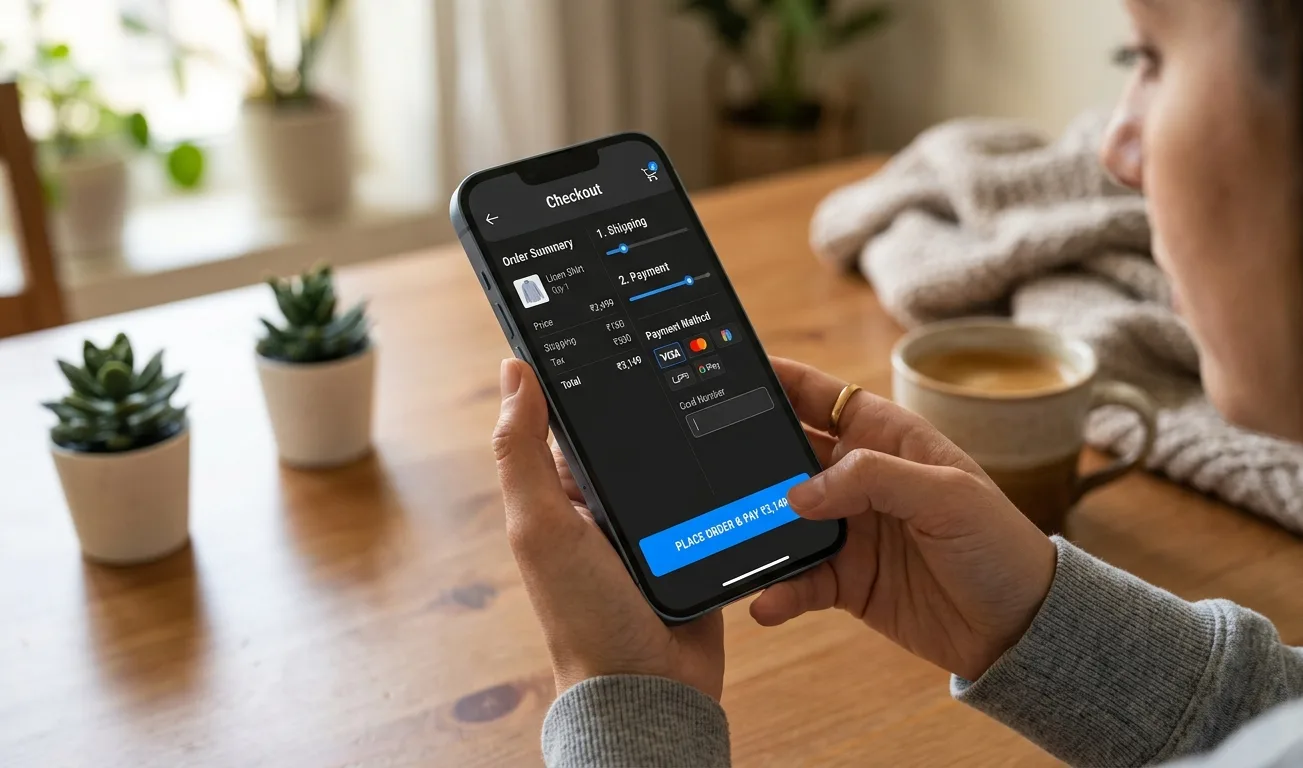
Checkout optimization is one of the most important strategies for increasing eCommerce sales because the checkout page is where customers decide whether to complete or abandon their purchase. Even if customers like your products and add them to the cart, a poor checkout experience can stop them from placing an order.
High cart abandonment, low conversion rates, slow checkout speed, hidden charges, limited payment options, complicated forms, and poor mobile checkout can reduce sales and revenue from your existing website traffic.
A smooth, fast, mobile-friendly, transparent, and trust-building checkout experience helps reduce friction, improve customer confidence, increase completed orders, and boost conversion rates.
WebCart Solutions helps eCommerce businesses improve checkout performance with Shopify checkout optimization, conversion-focused eCommerce development, payment gateway integration, abandoned cart automation, speed optimization, mobile-friendly checkout design, and ongoing support.
- Reduce cart abandonment with a simple and smooth checkout process
- Increase completed orders with clear pricing and multiple payment options
- Improve mobile checkout experience for better eCommerce conversions
- Recover lost sales with abandoned cart reminders and automation
1. Why Checkout Optimization Matters
Checkout optimization helps eCommerce stores reduce cart abandonment, increase completed orders, improve customer experience, build buyer trust, boost conversion rates, and generate more revenue from existing traffic. Even a small improvement in checkout experience can create a significant increase in sales.
2. Keep the Checkout Process Simple
A complicated checkout process can frustrate customers and make them leave before completing the purchase. A simple checkout helps customers move quickly from cart to payment with fewer distractions, clearer instructions, and less friction.
3. Simple Checkout Best Practices
- Reduce unnecessary checkout steps
- Ask only essential information
- Use clear field labels
- Avoid confusing forms
- Keep the layout clean and focused
- Make every step easy to understand
4. Offer Guest Checkout Option
Forcing customers to create an account before purchase can reduce conversions. Guest checkout allows shoppers to buy quickly, avoid extra steps, and complete orders without hesitation. Account creation can always be offered after the purchase is completed.
5. Show Clear Pricing and Charges
Unexpected costs are one of the biggest reasons for cart abandonment. Customers should clearly see product price, shipping charges, taxes, discounts, and final order total before payment. Transparent pricing builds trust and reduces checkout drop-offs.
6. Provide Multiple Payment Options
Customers prefer different payment methods, and limited payment options can stop users from completing purchases. Offering multiple payment choices makes checkout more convenient and improves the chances of completed orders.
7. Useful Payment Options for eCommerce Checkout
- UPI payments
- Debit and credit cards
- Net banking
- Wallet payments
- Cash on delivery
- EMI options
- Secure payment gateway options
8. Optimize Checkout for Mobile Users
Most customers shop from mobile devices, so your checkout must be mobile-friendly. A smooth mobile checkout experience helps customers fill forms easily, review orders quickly, select payment options comfortably, and complete purchases without frustration.
9. Mobile Checkout Optimization Checklist
- Easy-to-fill forms
- Large clickable buttons
- Fast loading checkout pages
- Simple mobile navigation
- Clear payment options
- Readable order summary
- Smooth checkout flow across all screen sizes
10. Improve Checkout Page Speed
Slow checkout pages can cause customers to leave before completing payment. Fast checkout improves user experience, reduces abandonment, and supports better conversions. Checkout pages should be lightweight, stable, and optimized for performance.
11. Checkout Speed Improvement Tips
- Optimize checkout-related images
- Reduce unnecessary scripts
- Remove heavy apps or plugins
- Use reliable hosting
- Keep checkout pages lightweight
- Test checkout speed regularly
12. Add Trust Signals on Checkout Page
Customers need confidence before making a payment. Trust signals help reduce hesitation and reassure buyers that their order, payment, and personal information are secure. Adding trust elements can improve checkout completion rates.
13. Important Checkout Trust Signals
- Secure payment badges
- SSL security indicators
- Return policy link
- Shipping policy link
- Customer support contact
- Payment gateway logos
- Clear privacy and refund information
14. Use Clear Call-to-Action Buttons
Checkout buttons should be clear, visible, and action-focused. Button text such as Continue to Payment, Place Order, Complete Purchase, and Pay Now helps customers understand the next step and take action confidently.
15. Reduce Form Fields
Long forms create friction during checkout and can increase abandonment. Only ask for necessary details such as name, phone number, email, shipping address, and payment details. Shorter forms help customers complete checkout faster.
16. Show Order Summary Clearly
Customers should know exactly what they are buying before making payment. A clear order summary helps customers review their order with confidence and reduces uncertainty during checkout.
17. What to Include in Order Summary
- Product image
- Product name
- Selected variant or size
- Quantity
- Product price
- Applied discount
- Shipping charge
- Final order total
18. Add Progress Indicators
If your checkout has multiple steps, progress indicators help customers understand where they are in the process. Steps such as cart, shipping, payment, and confirmation reduce confusion and make checkout feel easier and more predictable.
19. Enable Address Auto-Fill
Address auto-fill saves time and reduces typing errors, especially on mobile devices. It helps customers complete checkout faster, avoid incorrect address entries, and enjoy a smoother buying experience.
20. Provide Easy Coupon Code Experience
Coupon code fields should be easy to use but should not distract customers from completing checkout. Clearly show applied discounts, avoid making users leave checkout to find coupons, auto-apply discounts where possible, and use simple error messages.
21. Offer Multiple Shipping Options
- Standard delivery
- Express delivery
- Free shipping above minimum order value
- Local delivery where applicable
- Store pickup if available
- Clear delivery timelines
22. Send Abandoned Cart Reminders
Not every customer completes checkout the first time. Abandoned cart reminders help recover lost sales by bringing customers back to complete their purchase. Email reminders, WhatsApp automation, SMS reminders, and retargeting ads can improve recovery rates.
23. Common Checkout Mistakes to Avoid
- Too many checkout steps
- Forced account creation
- Hidden charges
- Limited payment methods
- Slow checkout speed
- Poor mobile checkout experience
- Missing trust signals
- Complicated coupon process
24. Why Choose WebCart Solutions
- Conversion-focused eCommerce development
- Shopify checkout optimization
- Speed and performance optimization
- Payment gateway integration
- Abandoned cart automation
- Mobile-friendly checkout design
- End-to-end support and maintenance
25. Conclusion
Checkout optimization is one of the most effective ways to increase eCommerce sales. A simple, fast, mobile-friendly, transparent, and trustworthy checkout experience helps customers complete purchases with confidence. By reducing friction, improving payment options, showing clear pricing, using trust signals, and recovering abandoned carts, your online store can increase conversions and generate more revenue. WebCart Solutions helps businesses optimize checkout experiences that reduce cart abandonment and improve sales performance.